



MyroP
@myrodev.bsky.social
33 yo dude creating and exploring worlds on VRChat.
I am mostly posting about WIP stuff, Unity and world recommendations.
I am mostly posting about WIP stuff, Unity and world recommendations.
(4/5) For worlds : You can GPU-instance "different" meshes by packing them into one mesh + UV atlas.
Create a "Tile discard" shader that uses an instanced property "tileToKeep" property, and set it via MaterialPropertyBlock.
Here, every mesh is GPU instanced, and renders in a single draw call.
Create a "Tile discard" shader that uses an instanced property "tileToKeep" property, and set it via MaterialPropertyBlock.
Here, every mesh is GPU instanced, and renders in a single draw call.


November 25, 2025 at 7:07 PM
(4/5) For worlds : You can GPU-instance "different" meshes by packing them into one mesh + UV atlas.
Create a "Tile discard" shader that uses an instanced property "tileToKeep" property, and set it via MaterialPropertyBlock.
Here, every mesh is GPU instanced, and renders in a single draw call.
Create a "Tile discard" shader that uses an instanced property "tileToKeep" property, and set it via MaterialPropertyBlock.
Here, every mesh is GPU instanced, and renders in a single draw call.
(3/5)
Second image has a few benchmarks
Second image has a few benchmarks


November 25, 2025 at 7:06 PM
(3/5)
Second image has a few benchmarks
Second image has a few benchmarks

(1/5) UV TILE DISCARD
UV Tile Discard is a really interesting feature supported by Poiyomi, LilToon, etc. It lets you toggle parts of a mesh on and off without needing to use blend shapes or multiple Skinned Mesh Renderers (SMRs), great for performance ranking!
#VRChat
UV Tile Discard is a really interesting feature supported by Poiyomi, LilToon, etc. It lets you toggle parts of a mesh on and off without needing to use blend shapes or multiple Skinned Mesh Renderers (SMRs), great for performance ranking!
#VRChat
November 25, 2025 at 7:04 PM
(1/5) UV TILE DISCARD
UV Tile Discard is a really interesting feature supported by Poiyomi, LilToon, etc. It lets you toggle parts of a mesh on and off without needing to use blend shapes or multiple Skinned Mesh Renderers (SMRs), great for performance ranking!
#VRChat
UV Tile Discard is a really interesting feature supported by Poiyomi, LilToon, etc. It lets you toggle parts of a mesh on and off without needing to use blend shapes or multiple Skinned Mesh Renderers (SMRs), great for performance ranking!
#VRChat
Malikart2022 recently released a new liminal-space VRChat world, and I’d recommend checking it out if you enjoy that genre!
The place is big, it took me about 40 minutes to reach the end (and I probably missed a few spots)
Poolroom Wonderland: vrchat.com/home/world/w...
#VRChat
The place is big, it took me about 40 minutes to reach the end (and I probably missed a few spots)
Poolroom Wonderland: vrchat.com/home/world/w...
#VRChat


November 17, 2025 at 6:40 PM
Malikart2022 recently released a new liminal-space VRChat world, and I’d recommend checking it out if you enjoy that genre!
The place is big, it took me about 40 minutes to reach the end (and I probably missed a few spots)
Poolroom Wonderland: vrchat.com/home/world/w...
#VRChat
The place is big, it took me about 40 minutes to reach the end (and I probably missed a few spots)
Poolroom Wonderland: vrchat.com/home/world/w...
#VRChat
Code below
The setup is basically a video player that gets rendered through the VRChat camera only
The setup is basically a video player that gets rendered through the VRChat camera only

November 15, 2025 at 3:02 PM
Code below
The setup is basically a video player that gets rendered through the VRChat camera only
The setup is basically a video player that gets rendered through the VRChat camera only
Inspired by the VRChat world "讐復を能える for VRChat" (by yu_nakaito) that features a system that plays an Audio source through the VRChat camera, I tried to do something similar for fun.
The second part shows that the audio source is attached to the lens, not the actual camera screen.
The second part shows that the audio source is attached to the lens, not the actual camera screen.
November 15, 2025 at 3:01 PM
Inspired by the VRChat world "讐復を能える for VRChat" (by yu_nakaito) that features a system that plays an Audio source through the VRChat camera, I tried to do something similar for fun.
The second part shows that the audio source is attached to the lens, not the actual camera screen.
The second part shows that the audio source is attached to the lens, not the actual camera screen.
It uses assets from the prefab, but I'm not sure if I'll make it playable yet, since I made a few modifications to the base asset, and I'm not sure if anyone would want to play bowling on such a short lane.

November 1, 2025 at 6:45 PM
It uses assets from the prefab, but I'm not sure if I'll make it playable yet, since I made a few modifications to the base asset, and I'm not sure if anyone would want to play bowling on such a short lane.

(2/2) The "Point Light Volume" component uses a custom cookie texture showing a blurred fan. I'm rotating the point light in sync with the fan, which creates the illusion that the fan is casting a shadow, but that's not the case, AFAIK "Point Light Volume" cannot cast RT shadows yet.


October 27, 2025 at 10:23 PM
(2/2) The "Point Light Volume" component uses a custom cookie texture showing a blurred fan. I'm rotating the point light in sync with the fan, which creates the illusion that the fan is casting a shadow, but that's not the case, AFAIK "Point Light Volume" cannot cast RT shadows yet.
(1/2) Using Ikeiwa's LV Volumetric fog shader and RedSim's "Point Light Volume" component, I was able to simulate a fan casting shadows in some fog.
#VRChat
#VRChat
October 27, 2025 at 10:22 PM
(1/2) Using Ikeiwa's LV Volumetric fog shader and RedSim's "Point Light Volume" component, I was able to simulate a fan casting shadows in some fog.
#VRChat
#VRChat
World PhysBones just got released in open beta (SDK 3.9.1) !
To test that new component, I made a door that works without any Udon code, and it was relatively easy to setup. Functionalities are very similar to avatar PhysBones, bones can be pushed and grabbed #VRChat
To test that new component, I made a door that works without any Udon code, and it was relatively easy to setup. Functionalities are very similar to avatar PhysBones, bones can be pushed and grabbed #VRChat
October 24, 2025 at 8:58 PM
World PhysBones just got released in open beta (SDK 3.9.1) !
To test that new component, I made a door that works without any Udon code, and it was relatively easy to setup. Functionalities are very similar to avatar PhysBones, bones can be pushed and grabbed #VRChat
To test that new component, I made a door that works without any Udon code, and it was relatively easy to setup. Functionalities are very similar to avatar PhysBones, bones can be pushed and grabbed #VRChat
(5/5) That's it! I hope my explanation was understandable and that you learned something new today.
The 300 character limit is pretty annoying, so I had to shorten some explanations...
The 300 character limit is pretty annoying, so I had to shorten some explanations...

October 18, 2025 at 3:39 PM
(5/5) That's it! I hope my explanation was understandable and that you learned something new today.
The 300 character limit is pretty annoying, so I had to shorten some explanations...
The 300 character limit is pretty annoying, so I had to shorten some explanations...
(4/5) About last point : careful with avatars hiding stuff you'd rather keep private:
- "X-ray" shaders can hide high-render-queue mats. Would suck to get reported just because someone in the instance used that shader....
- Also not everyone shows your avatar=>anims won't init your avatar properly.
- "X-ray" shaders can hide high-render-queue mats. Would suck to get reported just because someone in the instance used that shader....
- Also not everyone shows your avatar=>anims won't init your avatar properly.
October 18, 2025 at 3:38 PM
(4/5) About last point : careful with avatars hiding stuff you'd rather keep private:
- "X-ray" shaders can hide high-render-queue mats. Would suck to get reported just because someone in the instance used that shader....
- Also not everyone shows your avatar=>anims won't init your avatar properly.
- "X-ray" shaders can hide high-render-queue mats. Would suck to get reported just because someone in the instance used that shader....
- Also not everyone shows your avatar=>anims won't init your avatar properly.
(3/5) DRAWBACKS:
- Skybox trails: The skybox doesn't refresh behind low-render-queue transparent materials, leaving visible trails. If a world has bloom, emissive materials may turn into flashbang.
- X-ray effect: Any object with a higher render queue won't render behind that transparent material.
- Skybox trails: The skybox doesn't refresh behind low-render-queue transparent materials, leaving visible trails. If a world has bloom, emissive materials may turn into flashbang.
- X-ray effect: Any object with a higher render queue won't render behind that transparent material.
October 18, 2025 at 3:37 PM
(3/5) DRAWBACKS:
- Skybox trails: The skybox doesn't refresh behind low-render-queue transparent materials, leaving visible trails. If a world has bloom, emissive materials may turn into flashbang.
- X-ray effect: Any object with a higher render queue won't render behind that transparent material.
- Skybox trails: The skybox doesn't refresh behind low-render-queue transparent materials, leaving visible trails. If a world has bloom, emissive materials may turn into flashbang.
- X-ray effect: Any object with a higher render queue won't render behind that transparent material.
(2/5) Explanation :
This was impossible to fit under 300 characters, so here's a screenshot
This was impossible to fit under 300 characters, so here's a screenshot

October 18, 2025 at 3:35 PM
(2/5) Explanation :
This was impossible to fit under 300 characters, so here's a screenshot
This was impossible to fit under 300 characters, so here's a screenshot
(1/5) A little thread about render queue and depth buffer:
Wanna take pictures of your VRChat avatar with a nice depth of field, but transparent parts of your avatar aren't in the same focus plane?
Set the render queue of transparent materials to below 2500, like 2499, and enable ZWrite.
#VRChat
Wanna take pictures of your VRChat avatar with a nice depth of field, but transparent parts of your avatar aren't in the same focus plane?
Set the render queue of transparent materials to below 2500, like 2499, and enable ZWrite.
#VRChat


October 18, 2025 at 3:34 PM
(1/5) A little thread about render queue and depth buffer:
Wanna take pictures of your VRChat avatar with a nice depth of field, but transparent parts of your avatar aren't in the same focus plane?
Set the render queue of transparent materials to below 2500, like 2499, and enable ZWrite.
#VRChat
Wanna take pictures of your VRChat avatar with a nice depth of field, but transparent parts of your avatar aren't in the same focus plane?
Set the render queue of transparent materials to below 2500, like 2499, and enable ZWrite.
#VRChat
I just published a new version of the glass shader, it now supports :
- LTCGI
- Scrolling normals
- Chromatic aberration
I also fixed some minor issues.
#VRChat
github.com/MyroG/MyroP-...
- LTCGI
- Scrolling normals
- Chromatic aberration
I also fixed some minor issues.
#VRChat
github.com/MyroG/MyroP-...
October 14, 2025 at 8:40 PM
I just published a new version of the glass shader, it now supports :
- LTCGI
- Scrolling normals
- Chromatic aberration
I also fixed some minor issues.
#VRChat
github.com/MyroG/MyroP-...
- LTCGI
- Scrolling normals
- Chromatic aberration
I also fixed some minor issues.
#VRChat
github.com/MyroG/MyroP-...
Interesting, good to know, thanks for sharing!
Currently, I'm handling box projection with this line of code, but there's no cubemap blending since I am only working with unity_SpecCube0 (from what I've read I would also have to sample unity_SpecCube1)
Currently, I'm handling box projection with this line of code, but there's no cubemap blending since I am only working with unity_SpecCube0 (from what I've read I would also have to sample unity_SpecCube1)

October 14, 2025 at 2:52 PM
Interesting, good to know, thanks for sharing!
Currently, I'm handling box projection with this line of code, but there's no cubemap blending since I am only working with unity_SpecCube0 (from what I've read I would also have to sample unity_SpecCube1)
Currently, I'm handling box projection with this line of code, but there's no cubemap blending since I am only working with unity_SpecCube0 (from what I've read I would also have to sample unity_SpecCube1)
The two lines of code you can use to sample the reflection probe with a refraction effect.
IOR : Index of refraction (0~1)
MipMap : Blur level (The shader blurs the reflection probe texture by just sampling a lower level mipmap)
A fun little side project, I learned a few things while making it.
IOR : Index of refraction (0~1)
MipMap : Blur level (The shader blurs the reflection probe texture by just sampling a lower level mipmap)
A fun little side project, I learned a few things while making it.

October 12, 2025 at 1:49 PM
The two lines of code you can use to sample the reflection probe with a refraction effect.
IOR : Index of refraction (0~1)
MipMap : Blur level (The shader blurs the reflection probe texture by just sampling a lower level mipmap)
A fun little side project, I learned a few things while making it.
IOR : Index of refraction (0~1)
MipMap : Blur level (The shader blurs the reflection probe texture by just sampling a lower level mipmap)
A fun little side project, I learned a few things while making it.
I released on my GitHub a new shader : Frosted Glass.
The shader uses the scene's environment reflection (reflection probe) to fake transparency : The shader is actually fully opaque and doesn't use any grab pass.
You can download it here :
github.com/MyroG/MyroP-...
#VRChat
The shader uses the scene's environment reflection (reflection probe) to fake transparency : The shader is actually fully opaque and doesn't use any grab pass.
You can download it here :
github.com/MyroG/MyroP-...
#VRChat
October 12, 2025 at 1:47 PM
I released on my GitHub a new shader : Frosted Glass.
The shader uses the scene's environment reflection (reflection probe) to fake transparency : The shader is actually fully opaque and doesn't use any grab pass.
You can download it here :
github.com/MyroG/MyroP-...
#VRChat
The shader uses the scene's environment reflection (reflection probe) to fake transparency : The shader is actually fully opaque and doesn't use any grab pass.
You can download it here :
github.com/MyroG/MyroP-...
#VRChat


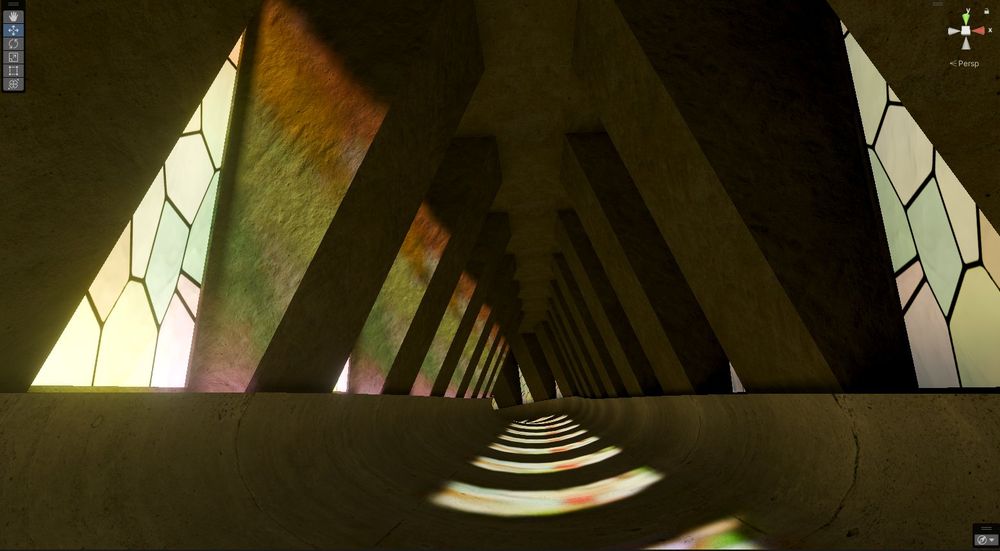
The default Unity baker also supports that feature, but it isn't well documented : In your shader, you need to add the shader keyword "_TransparencyLM" and set your texture in that field
docs.unity3d.com/6000.2/Docum...
The result can be seen below
docs.unity3d.com/6000.2/Docum...
The result can be seen below


September 29, 2025 at 5:33 PM
The default Unity baker also supports that feature, but it isn't well documented : In your shader, you need to add the shader keyword "_TransparencyLM" and set your texture in that field
docs.unity3d.com/6000.2/Docum...
The result can be seen below
docs.unity3d.com/6000.2/Docum...
The result can be seen below
The last Bakery update added the component "Bakery Light Filter", which allows you to easily bake light shining through stained glass, you just need to add that component on your stained glass mesh. No need to use custom cookie textures on your light sources anymore!
#VRChat
#VRChat

September 29, 2025 at 5:31 PM
The last Bakery update added the component "Bakery Light Filter", which allows you to easily bake light shining through stained glass, you just need to add that component on your stained glass mesh. No need to use custom cookie textures on your light sources anymore!
#VRChat
#VRChat