




Microsoft 365 Insider Program
@msft365insider.bsky.social
The official account for Microsoft 365 Insider: Shape the future of Microsoft 365 using Microsoft Teams, Word, Excel, PowerPoint, and more.
💡 Copilot Prompt of the Week: 'Describe my upcoming deadlines as characters in a holiday movie competing for the last parking spot.'

a man in a green elf costume is screaming while standing in a store .
ALT: a man in a green elf costume is screaming while standing in a store .
media.tenor.com
December 5, 2025 at 7:12 PM
💡 Copilot Prompt of the Week: 'Describe my upcoming deadlines as characters in a holiday movie competing for the last parking spot.'
Three new productivity-boosting Agents are now available in Microsoft 365 Copilot: App Builder, Workflows, and Surveys. These tools help you customize, automate, and gather insights faster.
Check out Mike's new tutorial to see them in action 👇
#Microsoft365Copilot #ProductivityAgents #AI
Check out Mike's new tutorial to see them in action 👇
#Microsoft365Copilot #ProductivityAgents #AI

A tutorial video showing 3 new productivity-boosting Agents that come with Microsoft 365 Copilot. These new Agents are:
🧩 App Builder
🔄 Workflows
📊 Surveys
YouTube 📺 youtu.be/OPVGuU1djMU?... #Microsoft
🧩 App Builder
🔄 Workflows
📊 Surveys
YouTube 📺 youtu.be/OPVGuU1djMU?... #Microsoft

New Agents in Copilot: How to Use App Builder, Workflows & Surveys
YouTube video by Mike Tholfsen
youtu.be
December 4, 2025 at 9:23 PM
Three new productivity-boosting Agents are now available in Microsoft 365 Copilot: App Builder, Workflows, and Surveys. These tools help you customize, automate, and gather insights faster.
Check out Mike's new tutorial to see them in action 👇
#Microsoft365Copilot #ProductivityAgents #AI
Check out Mike's new tutorial to see them in action 👇
#Microsoft365Copilot #ProductivityAgents #AI
🔄 Ever wish you could turn back time? Now you can! View and restore previous versions of your Microsoft 365 Copilot Pages on Windows, Mac, or the web. techcommunity.microsoft.com/blog/microso...
#Microsoft365Copilot #Msft365Insiders
#Microsoft365Copilot #Msft365Insiders

View or restore previous versions of Microsoft 365 Copilot Pages
With version history in Microsoft 365 Copilot Pages, you can now explore and revert to earlier versions of your work.
techcommunity.microsoft.com
December 3, 2025 at 7:01 PM
🔄 Ever wish you could turn back time? Now you can! View and restore previous versions of your Microsoft 365 Copilot Pages on Windows, Mac, or the web. techcommunity.microsoft.com/blog/microso...
#Microsoft365Copilot #Msft365Insiders
#Microsoft365Copilot #Msft365Insiders
🌟 In honor of International Day of Persons with Disabilities, we’re sharing new accessibility updates across Microsoft 365. Narrator and Word now offer more natural reading, smarter shortcuts, and richer image descriptions.
Explore what's new:
techcommunity.microsoft.com/blog/microso...
Explore what's new:
techcommunity.microsoft.com/blog/microso...

International Day of Persons with Disabilities: Our commitment to a better screen reader experience
We’ve made enhancements to Narrator, Microsoft Word, and other Microsoft 365 apps to build a better experience for all, especially those who are blind or...
techcommunity.microsoft.com
December 3, 2025 at 5:02 PM
🌟 In honor of International Day of Persons with Disabilities, we’re sharing new accessibility updates across Microsoft 365. Narrator and Word now offer more natural reading, smarter shortcuts, and richer image descriptions.
Explore what's new:
techcommunity.microsoft.com/blog/microso...
Explore what's new:
techcommunity.microsoft.com/blog/microso...
❌ Error no more. Excel for Windows now shows descriptive error cards that help you understand what went wrong and how to fix it, fast. Learn how it works: techcommunity.microsoft.com/blog/microso... ✅

Understand and fix errors with descriptive error cards in Excel
When you hover over an error indicator in a cell in Microsoft Excel for Windows, you’ll see more context explaining what the error is, how it was generated,...
techcommunity.microsoft.com
December 3, 2025 at 12:06 AM
❌ Error no more. Excel for Windows now shows descriptive error cards that help you understand what went wrong and how to fix it, fast. Learn how it works: techcommunity.microsoft.com/blog/microso... ✅
Mike Tholfsen just dropped a fresh update on 6 new features in the Microsoft 365 Copilot app. New tools, smarter workflows, and more ways to create with Copilot. 👇🎥
#AI #Microsoft365Copilot #EdTech
#AI #Microsoft365Copilot #EdTech
A tutorial video showing 6 new features in the Microsoft 365 Copilot app. Updates include:
✨ New Navigation experience
⏰ Scheduled Prompts
🎥 Create Video with AI
📝 Surveys Agent
➕ Lots more
YouTube 📺 youtu.be/zEtKNf9avkY?... #Microsoft
✨ New Navigation experience
⏰ Scheduled Prompts
🎥 Create Video with AI
📝 Surveys Agent
➕ Lots more
YouTube 📺 youtu.be/zEtKNf9avkY?... #Microsoft

6 New Features in Microsoft 365 Copilot (2025 Update)
YouTube video by Mike Tholfsen
youtu.be
December 2, 2025 at 7:58 PM
Mike Tholfsen just dropped a fresh update on 6 new features in the Microsoft 365 Copilot app. New tools, smarter workflows, and more ways to create with Copilot. 👇🎥
#AI #Microsoft365Copilot #EdTech
#AI #Microsoft365Copilot #EdTech
Mike Tholfsen just dropped a fresh update on 6 new features in the Microsoft 365 Copilot app. New tools, smarter workflows, and more ways to create with Copilot. Pretty slick new features!👇🎥
#AI #Microsoft365Copilot #EdTech
#AI #Microsoft365Copilot #EdTech
A tutorial video showing 6 new features in the Microsoft 365 Copilot app. Updates include:
✨ New Navigation experience
⏰ Scheduled Prompts
🎥 Create Video with AI
📝 Surveys Agent
➕ Lots more
YouTube 📺 youtu.be/zEtKNf9avkY?... #Microsoft
✨ New Navigation experience
⏰ Scheduled Prompts
🎥 Create Video with AI
📝 Surveys Agent
➕ Lots more
YouTube 📺 youtu.be/zEtKNf9avkY?... #Microsoft
6 New Features in Microsoft 365 Copilot (2025 Update)
YouTube video by Mike Tholfsen
youtu.be
December 2, 2025 at 7:52 PM
Mike Tholfsen just dropped a fresh update on 6 new features in the Microsoft 365 Copilot app. New tools, smarter workflows, and more ways to create with Copilot. Pretty slick new features!👇🎥
#AI #Microsoft365Copilot #EdTech
#AI #Microsoft365Copilot #EdTech
📖 Screen reader users can now navigate comments in Word more easily with improved keyboard shortcuts.
Details in our new blog: techcommunity.microsoft.com/blog/Microso...
These updates were shaped by real user feedback, so thank you!
#MicrosoftWord #WordforWindows #Accessibility
Details in our new blog: techcommunity.microsoft.com/blog/Microso...
These updates were shaped by real user feedback, so thank you!
#MicrosoftWord #WordforWindows #Accessibility

Improved keyboard and Narrator support for comments in Word for Windows | Microsoft Community Hub
These new improvements to Microsoft Word for Windows make keyboard and screen reader navigation for comments more efficient and intuitive.
techcommunity.microsoft.com
December 2, 2025 at 4:56 PM
📖 Screen reader users can now navigate comments in Word more easily with improved keyboard shortcuts.
Details in our new blog: techcommunity.microsoft.com/blog/Microso...
These updates were shaped by real user feedback, so thank you!
#MicrosoftWord #WordforWindows #Accessibility
Details in our new blog: techcommunity.microsoft.com/blog/Microso...
These updates were shaped by real user feedback, so thank you!
#MicrosoftWord #WordforWindows #Accessibility
🎓 Today at 9 a.m. PT: "Microsoft 365 Copilot magic" Join Episode 5 of our AI Superstar series. You'll walk away with practical use cases for Copilot you can apply to work and life. It's free, it's live, and it's super useful.
Catch it here 👉 www.linkedin.com/events/73987...
Catch it here 👉 www.linkedin.com/events/73987...

December 2, 2025 at 4:10 PM
🎓 Today at 9 a.m. PT: "Microsoft 365 Copilot magic" Join Episode 5 of our AI Superstar series. You'll walk away with practical use cases for Copilot you can apply to work and life. It's free, it's live, and it's super useful.
Catch it here 👉 www.linkedin.com/events/73987...
Catch it here 👉 www.linkedin.com/events/73987...
🎧 Word for Windows now speaks your keyboard shortcuts.
A new update adds audio feedback for 60+ keyboard commands, making Word more accessible and helping you work smarter, not harder.
Read our latest blog: techcommunity.microsoft.com/blog/microso...
#MicrosoftWord #WordForWindows #WordShortcut
A new update adds audio feedback for 60+ keyboard commands, making Word more accessible and helping you work smarter, not harder.
Read our latest blog: techcommunity.microsoft.com/blog/microso...
#MicrosoftWord #WordForWindows #WordShortcut

Better screen reader experience: Audio feedback for 60+ Word keyboard shortcuts
Microsoft Word began offering verbal confirmations for common keyboard shortcuts last year. We’ve since expanded support to 60+ additional scenarios,...
techcommunity.microsoft.com
November 25, 2025 at 4:56 PM
🎧 Word for Windows now speaks your keyboard shortcuts.
A new update adds audio feedback for 60+ keyboard commands, making Word more accessible and helping you work smarter, not harder.
Read our latest blog: techcommunity.microsoft.com/blog/microso...
#MicrosoftWord #WordForWindows #WordShortcut
A new update adds audio feedback for 60+ keyboard commands, making Word more accessible and helping you work smarter, not harder.
Read our latest blog: techcommunity.microsoft.com/blog/microso...
#MicrosoftWord #WordForWindows #WordShortcut
🎨 PowerPoint fans, this one’s for you. New Copilot updates like AI slide builder, creative mode, AI images, and more, so check out the full walkthrough from Mike. 👇
A tutorial video showing the ALL NEW Copilot in PowerPoint, which just got major improvements. Includes:
🧠 AI Slide builder
🎨 Creative mode
🖼️ AI Images
🪄 Create slide with Copilot
🌍 Create full deck in new language
➕ More
YouTube 📺 youtu.be/mQDTJTGIvhg?... #Microsoft
🧠 AI Slide builder
🎨 Creative mode
🖼️ AI Images
🪄 Create slide with Copilot
🌍 Create full deck in new language
➕ More
YouTube 📺 youtu.be/mQDTJTGIvhg?... #Microsoft

Copilot in PowerPoint Tutorial (2025) – New AI Features & Massive Improvements
YouTube video by Mike Tholfsen
youtu.be
November 25, 2025 at 12:23 AM
🎨 PowerPoint fans, this one’s for you. New Copilot updates like AI slide builder, creative mode, AI images, and more, so check out the full walkthrough from Mike. 👇
📢 Great news for IT admins! Discover the latest deployment options for Microsoft 365 Apps with our comprehensive guide. Streamline your deployment process and enhance productivity. learn.microsoft.com/en-us/micros...
#Microsoft365 #Msft365Insiders #ITAdmins
#Microsoft365 #Msft365Insiders #ITAdmins

Options for deploying Microsoft 365 Insider - Microsoft 365 Insider
Provides an overview of the deployment options for Microsoft 365 Insider for Windows and Mac
learn.microsoft.com
November 22, 2025 at 9:43 PM
📢 Great news for IT admins! Discover the latest deployment options for Microsoft 365 Apps with our comprehensive guide. Streamline your deployment process and enhance productivity. learn.microsoft.com/en-us/micros...
#Microsoft365 #Msft365Insiders #ITAdmins
#Microsoft365 #Msft365Insiders #ITAdmins
🚀 November’s SharePoint Showcase is here. Get the biggest announcements from Microsoft Ignite, including Copilot-powered metadata, improvements to FAQs, and more.
🔗 techcommunity.microsoft.com/blog/Microso...
#MSIgnite #SharePoint #Microsoft365
🔗 techcommunity.microsoft.com/blog/Microso...
#MSIgnite #SharePoint #Microsoft365

SharePoint Showcase highlights: Biggest news from Microsoft Ignite 2025
We’re excited to introduce a wave of new capabilities in Microsoft SharePoint that help you surface rich insights from your enterprise data and unlock new...
techcommunity.microsoft.com
November 21, 2025 at 5:00 PM
🚀 November’s SharePoint Showcase is here. Get the biggest announcements from Microsoft Ignite, including Copilot-powered metadata, improvements to FAQs, and more.
🔗 techcommunity.microsoft.com/blog/Microso...
#MSIgnite #SharePoint #Microsoft365
🔗 techcommunity.microsoft.com/blog/Microso...
#MSIgnite #SharePoint #Microsoft365
📝 Big upgrade for meeting notes. OneNote + Teams + Loop is a time-saving trio. 🙌
A short tutorial video on the all-new OneNote Meeting Details updates to improve Teams and Loop integration with meeting notes 📝 A major time saver and efficiency improvement to OneNote.
YouTube 📺 youtu.be/hMIkjDEg_54?... #onenote
YouTube 📺 youtu.be/hMIkjDEg_54?... #onenote

OneNote and Teams Meeting Notes Tutorial (2025) – New Features + How It Works
YouTube video by Mike Tholfsen
youtu.be
November 20, 2025 at 2:08 PM
📝 Big upgrade for meeting notes. OneNote + Teams + Loop is a time-saving trio. 🙌
✨ Microsoft 365 Copilot in PowerPoint now lets you steer tone, length, style, and image preferences when creating a deck. Whether you want a short persuasive pitch or a long professional report, Copilot’s got you. techcommunity.microsoft.com/blog/microso... #CopilotInPowerPoint

Steer length, tone, style, and images when creating a PowerPoint presentation with Copilot
You can now choose between several length, tone, image, and style options when using Microsoft 365 Copilot to make a presentation in Microsoft PowerPoint for...
techcommunity.microsoft.com
November 18, 2025 at 6:59 PM
✨ Microsoft 365 Copilot in PowerPoint now lets you steer tone, length, style, and image preferences when creating a deck. Whether you want a short persuasive pitch or a long professional report, Copilot’s got you. techcommunity.microsoft.com/blog/microso... #CopilotInPowerPoint
✨ Accessible content starts with great alt text.
Word and PowerPoint for Windows now use generative AI to write richer, more descriptive image alt text, so you don’t have to manually add it yourself.
See the difference in accessibility: techcommunity.microsoft.com/blog/microso...
#generativeAI
Word and PowerPoint for Windows now use generative AI to write richer, more descriptive image alt text, so you don’t have to manually add it yourself.
See the difference in accessibility: techcommunity.microsoft.com/blog/microso...
#generativeAI
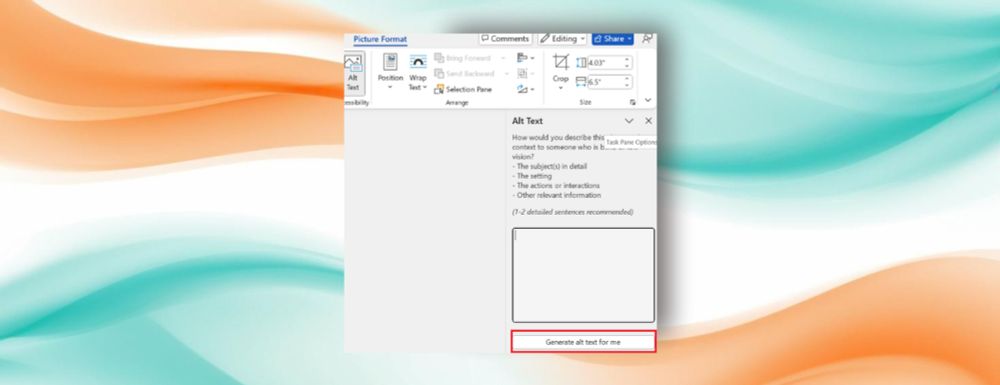
Richer alt text in Word and PowerPoint, powered by generative AI
Leveraging generative AI, you can write richer, more descriptive, and more context-aware image descriptions in Microsoft Word and PowerPoint for Windows.
msft.it
November 18, 2025 at 5:21 PM
✨ Accessible content starts with great alt text.
Word and PowerPoint for Windows now use generative AI to write richer, more descriptive image alt text, so you don’t have to manually add it yourself.
See the difference in accessibility: techcommunity.microsoft.com/blog/microso...
#generativeAI
Word and PowerPoint for Windows now use generative AI to write richer, more descriptive image alt text, so you don’t have to manually add it yourself.
See the difference in accessibility: techcommunity.microsoft.com/blog/microso...
#generativeAI
✨ Accessible content starts with great alt text.
Word and PowerPoint for Windows now use generative AI to write richer, more descriptive image alt text, so you don’t have to manually add it yourself.
See the difference in accessibility: msft.it/63173tR2oS
#generativeAI #powerpoint
Word and PowerPoint for Windows now use generative AI to write richer, more descriptive image alt text, so you don’t have to manually add it yourself.
See the difference in accessibility: msft.it/63173tR2oS
#generativeAI #powerpoint
Richer alt text in Word and PowerPoint, powered by generative AI
Leveraging generative AI, you can write richer, more descriptive, and more context-aware image descriptions in Microsoft Word and PowerPoint for Windows.
msft.it
November 18, 2025 at 5:19 PM
✨ Accessible content starts with great alt text.
Word and PowerPoint for Windows now use generative AI to write richer, more descriptive image alt text, so you don’t have to manually add it yourself.
See the difference in accessibility: msft.it/63173tR2oS
#generativeAI #powerpoint
Word and PowerPoint for Windows now use generative AI to write richer, more descriptive image alt text, so you don’t have to manually add it yourself.
See the difference in accessibility: msft.it/63173tR2oS
#generativeAI #powerpoint
💡 Rephrase your PowerPoint slide text in seconds with Microsoft 365 Copilot. Use Auto-rewrite, Condense, Make it a list, and Make professional to fine-tune your story and match your tone to your audience.
📋 Learn more: techcommunity.microsoft.com/blog/microso... #PowerPoint #Microsoft365Copilot
📋 Learn more: techcommunity.microsoft.com/blog/microso... #PowerPoint #Microsoft365Copilot

Rephrase text to suit your presentation narrative with Copilot
Rewriting text in your slides is now quicker and more intuitive with Microsoft 365 Copilot in PowerPoint for Windows and for the web. With just one click,...
techcommunity.microsoft.com
November 17, 2025 at 6:58 PM
💡 Rephrase your PowerPoint slide text in seconds with Microsoft 365 Copilot. Use Auto-rewrite, Condense, Make it a list, and Make professional to fine-tune your story and match your tone to your audience.
📋 Learn more: techcommunity.microsoft.com/blog/microso... #PowerPoint #Microsoft365Copilot
📋 Learn more: techcommunity.microsoft.com/blog/microso... #PowerPoint #Microsoft365Copilot
✨ Searching in OneNote on Windows is now a lot less disruptive. The new search dropdown placement keeps your content visible while you browse results, especially in Horizontal Tabs view.
🔗 techcommunity.microsoft.com/blog/microso... #OneNote
🔗 techcommunity.microsoft.com/blog/microso... #OneNote

Improved search dropdown placement in OneNote on Windows
With this update, we’ve repositioned the search dropdown to minimize overlap with your Microsoft OneNote page. Now, it’s easier to browse, find, and open...
techcommunity.microsoft.com
November 14, 2025 at 4:59 PM
✨ Searching in OneNote on Windows is now a lot less disruptive. The new search dropdown placement keeps your content visible while you browse results, especially in Horizontal Tabs view.
🔗 techcommunity.microsoft.com/blog/microso... #OneNote
🔗 techcommunity.microsoft.com/blog/microso... #OneNote
🎉 Our November Insider Round-Up newsletter is live, and the Microsoft 365 Insider program turns 10 today!
We’re grateful for this community.
This month: Copilot in People, Files & Calendar, refreshed icons, Teams chat updates, and a modern iOS home.
🔗 www.linkedin.com/pulse/micros... 🎉
We’re grateful for this community.
This month: Copilot in People, Files & Calendar, refreshed icons, Teams chat updates, and a modern iOS home.
🔗 www.linkedin.com/pulse/micros... 🎉

Microsoft 365 Insider Round-Up: November 2025
The Microsoft 365 Insider program is 10 years old today. How the time flies! Thank you for being a part of this community, and keep providing feedback so we can make our products the best they can be ...
www.linkedin.com
November 13, 2025 at 8:06 PM
🎉 Our November Insider Round-Up newsletter is live, and the Microsoft 365 Insider program turns 10 today!
We’re grateful for this community.
This month: Copilot in People, Files & Calendar, refreshed icons, Teams chat updates, and a modern iOS home.
🔗 www.linkedin.com/pulse/micros... 🎉
We’re grateful for this community.
This month: Copilot in People, Files & Calendar, refreshed icons, Teams chat updates, and a modern iOS home.
🔗 www.linkedin.com/pulse/micros... 🎉
🥳 We’re 10! Thanks to Insiders everywhere for helping us increase productivity across Microsoft 365 apps & services through feedback. techcommunity.microsoft.com/blog/microso... 🎉
#10YearsStrong #Msft365Insiders
#10YearsStrong #Msft365Insiders

Microsoft 365 Insider program turns 10!
Microsoft 365 has come a long way, from introducing features that facilitate productivity to advancements in accessibility and artificial intelligence. And...
techcommunity.microsoft.com
November 13, 2025 at 5:01 PM
🥳 We’re 10! Thanks to Insiders everywhere for helping us increase productivity across Microsoft 365 apps & services through feedback. techcommunity.microsoft.com/blog/microso... 🎉
#10YearsStrong #Msft365Insiders
#10YearsStrong #Msft365Insiders
🎄 Sleigh the season with Microsoft Copilot.
Plan trips, prep meals, and find gifts ahead of the holiday rush, all through simple prompts that keep the chaos at bay.
Get inspired by our latest blog: techcommunity.microsoft.com/blog/Microso... 🎅
#Microsoft365 #MicrosoftCopilot #HolidayPlanning
Plan trips, prep meals, and find gifts ahead of the holiday rush, all through simple prompts that keep the chaos at bay.
Get inspired by our latest blog: techcommunity.microsoft.com/blog/Microso... 🎅
#Microsoft365 #MicrosoftCopilot #HolidayPlanning

Sleigh the season: Holiday hacks with Microsoft Copilot
Use Microsoft Copilot to plan a holiday trip, outline an itinerary for visiting guests, prep a delicious meal, or find shopping deals.
techcommunity.microsoft.com
November 6, 2025 at 4:50 PM
🎄 Sleigh the season with Microsoft Copilot.
Plan trips, prep meals, and find gifts ahead of the holiday rush, all through simple prompts that keep the chaos at bay.
Get inspired by our latest blog: techcommunity.microsoft.com/blog/Microso... 🎅
#Microsoft365 #MicrosoftCopilot #HolidayPlanning
Plan trips, prep meals, and find gifts ahead of the holiday rush, all through simple prompts that keep the chaos at bay.
Get inspired by our latest blog: techcommunity.microsoft.com/blog/Microso... 🎅
#Microsoft365 #MicrosoftCopilot #HolidayPlanning
💡 Tip for SharePoint users
Over three million SharePoint agents have already been created to automate teamwork. They answer questions, summarize files, and help onboard new hires using your existing content. Build one for your team in minutes: techcommunity.microsoft.com/blog/microso...
Over three million SharePoint agents have already been created to automate teamwork. They answer questions, summarize files, and help onboard new hires using your existing content. Build one for your team in minutes: techcommunity.microsoft.com/blog/microso...

SharePoint Showcase highlights: Get the most out of SharePoint agents
SharePoint agents can reshape and improve how you make decisions, work as a team, and conduct business overall. Here's how they work.
techcommunity.microsoft.com
November 6, 2025 at 1:55 PM
💡 Tip for SharePoint users
Over three million SharePoint agents have already been created to automate teamwork. They answer questions, summarize files, and help onboard new hires using your existing content. Build one for your team in minutes: techcommunity.microsoft.com/blog/microso...
Over three million SharePoint agents have already been created to automate teamwork. They answer questions, summarize files, and help onboard new hires using your existing content. Build one for your team in minutes: techcommunity.microsoft.com/blog/microso...
💡 Think you know Microsoft Planner? Think again.
From bulk editing to Copilot-powered reports, these seven hidden gems help you plan, collaborate, and save time.
📋 Read the latest Microsoft 365 Insider blog to see the features: techcommunity.microsoft.com/blog/Microso...
From bulk editing to Copilot-powered reports, these seven hidden gems help you plan, collaborate, and save time.
📋 Read the latest Microsoft 365 Insider blog to see the features: techcommunity.microsoft.com/blog/Microso...

7 hidden gems to effectively manage your tasks in Microsoft Planner
Update multiple tasks at once, filter by critical path, export a plan to Excel, and more with these underrated features in Microsoft Planner.
techcommunity.microsoft.com
November 3, 2025 at 4:51 PM
💡 Think you know Microsoft Planner? Think again.
From bulk editing to Copilot-powered reports, these seven hidden gems help you plan, collaborate, and save time.
📋 Read the latest Microsoft 365 Insider blog to see the features: techcommunity.microsoft.com/blog/Microso...
From bulk editing to Copilot-powered reports, these seven hidden gems help you plan, collaborate, and save time.
📋 Read the latest Microsoft 365 Insider blog to see the features: techcommunity.microsoft.com/blog/Microso...
🎨 Missed this? New icons, new vibes! Your favorite Microsoft 365 apps just got a bold redesign. Check them out: msft.it/6013s7MoL

New Microsoft 365 icons for the AI era
The newly designed app icons reflect a strategic shift in Microsoft 365: unified, intuitive, and designed for flow across every canvas.
msft.it
November 1, 2025 at 4:42 PM
🎨 Missed this? New icons, new vibes! Your favorite Microsoft 365 apps just got a bold redesign. Check them out: msft.it/6013s7MoL