


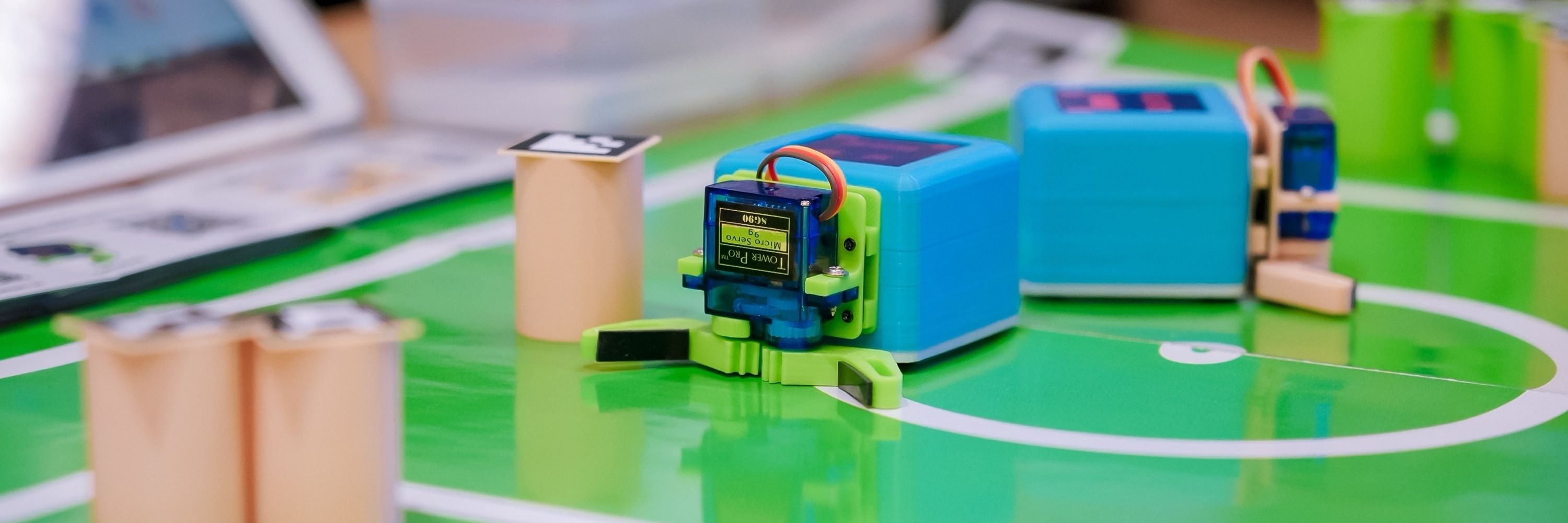

CoCube
@cocubefun.bsky.social
A turtle for the belly😋
A turtle for the mind🤯.
@microblocks.bsky.social
@cocubefun.bsky.social
#computer #Coding #STEAM #Robot #kids #education #hardware #microblocks #logo #scratch
A turtle for the mind🤯.
@microblocks.bsky.social
@cocubefun.bsky.social
#computer #Coding #STEAM #Robot #kids #education #hardware #microblocks #logo #scratch

November 28, 2025 at 10:27 AM
A turtle for the belly😋
A turtle for the mind🤯.
@microblocks.bsky.social
@cocubefun.bsky.social
#computer #Coding #STEAM #Robot #kids #education #hardware #microblocks #logo #scratch
A turtle for the mind🤯.
@microblocks.bsky.social
@cocubefun.bsky.social
#computer #Coding #STEAM #Robot #kids #education #hardware #microblocks #logo #scratch


Maker Faire Shenzhen 2025!
Thanks to all the friends who came to the CoCube booth!
#CoCube #makerfaire #Shenzhen #microblocks
Thanks to all the friends who came to the CoCube booth!
#CoCube #makerfaire #Shenzhen #microblocks


November 18, 2025 at 11:07 AM
Maker Faire Shenzhen 2025!
Thanks to all the friends who came to the CoCube booth!
#CoCube #makerfaire #Shenzhen #microblocks
Thanks to all the friends who came to the CoCube booth!
#CoCube #makerfaire #Shenzhen #microblocks
Using a DLight sensor, one user made #CoCube detect and move toward a phone’s flashlight — turning it into a true light-seeking robot! ⚡️
#micoblocks #ESP32 #Maker #Robot #STEAM
cocuberobot.com
#micoblocks #ESP32 #Maker #Robot #STEAM
cocuberobot.com
November 3, 2025 at 8:06 AM
Using a DLight sensor, one user made #CoCube detect and move toward a phone’s flashlight — turning it into a true light-seeking robot! ⚡️
#micoblocks #ESP32 #Maker #Robot #STEAM
cocuberobot.com
#micoblocks #ESP32 #Maker #Robot #STEAM
cocuberobot.com
This was our first workshop for high school students. I never imagined #CoCube could bring so much joy to first-year students!
We really hope that through #CoCube and @microblocks.bsky.social, more students around the world will develop a curiosity about science and technology!🗺️
#Education #Robot
We really hope that through #CoCube and @microblocks.bsky.social, more students around the world will develop a curiosity about science and technology!🗺️
#Education #Robot


October 25, 2025 at 4:29 PM
This was our first workshop for high school students. I never imagined #CoCube could bring so much joy to first-year students!
We really hope that through #CoCube and @microblocks.bsky.social, more students around the world will develop a curiosity about science and technology!🗺️
#Education #Robot
We really hope that through #CoCube and @microblocks.bsky.social, more students around the world will develop a curiosity about science and technology!🗺️
#Education #Robot
This was the first time for these teachers to use #Microblocks.
In just 45 minutes, the teachers used tablets and mobile phones to program and control #CoCube Robot to complete all programming tasks!
Visit our website to learn more!
cocuberobot.com
@microblocks.bsky.social
In just 45 minutes, the teachers used tablets and mobile phones to program and control #CoCube Robot to complete all programming tasks!
Visit our website to learn more!
cocuberobot.com
@microblocks.bsky.social
October 24, 2025 at 4:10 PM
This was the first time for these teachers to use #Microblocks.
In just 45 minutes, the teachers used tablets and mobile phones to program and control #CoCube Robot to complete all programming tasks!
Visit our website to learn more!
cocuberobot.com
@microblocks.bsky.social
In just 45 minutes, the teachers used tablets and mobile phones to program and control #CoCube Robot to complete all programming tasks!
Visit our website to learn more!
cocuberobot.com
@microblocks.bsky.social
We gave more than 30 primary and secondary school technology teachers a #CoCube and #Microblocks experience! The teachers used their mobile phones to program CoCube Robot in real time!
Teachers said CoCube Robot was very suitable for their students to learn! 😍
@microblocks.bsky.social
Teachers said CoCube Robot was very suitable for their students to learn! 😍
@microblocks.bsky.social


October 24, 2025 at 4:01 PM
We gave more than 30 primary and secondary school technology teachers a #CoCube and #Microblocks experience! The teachers used their mobile phones to program CoCube Robot in real time!
Teachers said CoCube Robot was very suitable for their students to learn! 😍
@microblocks.bsky.social
Teachers said CoCube Robot was very suitable for their students to learn! 😍
@microblocks.bsky.social
In the Snap!, each sprite connects to a #CoCube via BLE. You can easily control each CoCube robot to perform different functions! (The video demonstrates sending the same command.)
You can accomplish this by writing a simple communication program for the CoCube using the @microblocks.bsky.social
You can accomplish this by writing a simple communication program for the CoCube using the @microblocks.bsky.social
October 16, 2025 at 1:19 PM
In the Snap!, each sprite connects to a #CoCube via BLE. You can easily control each CoCube robot to perform different functions! (The video demonstrates sending the same command.)
You can accomplish this by writing a simple communication program for the CoCube using the @microblocks.bsky.social
You can accomplish this by writing a simple communication program for the CoCube using the @microblocks.bsky.social
Reposted by CoCube

John Maloney will show you how to get started with MicroBlocks and introduce some fun beginner activities. It will also show how to use the micro:bit's sensors to explore the world around us. Register at makered.org

October 9, 2025 at 5:01 AM
John Maloney will show you how to get started with MicroBlocks and introduce some fun beginner activities. It will also show how to use the micro:bit's sensors to explore the world around us. Register at makered.org
Reposted by CoCube

I have just updated Snap's neural networks extension with the capability for multinomial classification. You can now generate a block that directly reports the class name of a sample record for data sets with three or more categories.
snap.berkeley.edu/run
snap.berkeley.edu/run
October 15, 2025 at 12:48 PM
I have just updated Snap's neural networks extension with the capability for multinomial classification. You can now generate a block that directly reports the class name of a sample record for data sets with three or more categories.
snap.berkeley.edu/run
snap.berkeley.edu/run
At 2025 Apsara Conference (Yunqi Conference), Children use @microblocks.bsky.social to program CoCube to achieve challenges such as playing football, crossing the maze, and identifying traffic cards.
Children love CoCube and MicroBlocks so much!
#education #Microblocks #cocube #robot
Children love CoCube and MicroBlocks so much!
#education #Microblocks #cocube #robot




October 8, 2025 at 2:30 AM
At 2025 Apsara Conference (Yunqi Conference), Children use @microblocks.bsky.social to program CoCube to achieve challenges such as playing football, crossing the maze, and identifying traffic cards.
Children love CoCube and MicroBlocks so much!
#education #Microblocks #cocube #robot
Children love CoCube and MicroBlocks so much!
#education #Microblocks #cocube #robot
Design a magnetic Hub for the #CoCube robot, which can be used with various modules of #Keyestudio and can be easily programmed in #MicroBlocks!
Thanks to Keyestudio for giving me so many interesting and high-quality modules!
Thanks to Keyestudio for giving me so many interesting and high-quality modules!


October 5, 2025 at 1:55 PM
Design a magnetic Hub for the #CoCube robot, which can be used with various modules of #Keyestudio and can be easily programmed in #MicroBlocks!
Thanks to Keyestudio for giving me so many interesting and high-quality modules!
Thanks to Keyestudio for giving me so many interesting and high-quality modules!
Test running MicroBlocks on mobile phones and tablets!
@microblocks.bsky.social
#CoCube #Physical #Scratch
@microblocks.bsky.social
#CoCube #Physical #Scratch


September 23, 2025 at 4:56 PM
Test running MicroBlocks on mobile phones and tablets!
@microblocks.bsky.social
#CoCube #Physical #Scratch
@microblocks.bsky.social
#CoCube #Physical #Scratch
In this version, #CoCube has a lot of detail upgrades! We look forward to giving you a better experience. And thanks to the Microblocks team! @microblocks.bsky.social
New Pilot Release. Run or download the latest pilot release from here microblocks.fun/download

September 21, 2025 at 4:25 AM
In this version, #CoCube has a lot of detail upgrades! We look forward to giving you a better experience. And thanks to the Microblocks team! @microblocks.bsky.social
Reposted by CoCube


FOSDEM 2026 - FOSDEM 2026: 31st January and 1st February
Brussels / 31 & 1 January 2026
fosdem.org
September 19, 2025 at 9:22 AM


Reposted by CoCube
Nuevo Setup preparado para grabar tutoriales de
steamakersblocks @microblocks.bsky.social @cocubefun.bsky.social @fgcoca.bsky.social @tonimorenorey.bsky.social
steamakersblocks @microblocks.bsky.social @cocubefun.bsky.social @fgcoca.bsky.social @tonimorenorey.bsky.social


September 7, 2025 at 4:54 PM
Nuevo Setup preparado para grabar tutoriales de
steamakersblocks @microblocks.bsky.social @cocubefun.bsky.social @fgcoca.bsky.social @tonimorenorey.bsky.social
steamakersblocks @microblocks.bsky.social @cocubefun.bsky.social @fgcoca.bsky.social @tonimorenorey.bsky.social
Just shared the project “Multi-Robot Control with Snap! and MicroBlocks” on Snap!Con 2025.
You can see the video here!
@cocubefun.bsky.social
@microblocks.bsky.social
#Snap!
youtu.be/1f9Jyag6XJA
You can see the video here!
@cocubefun.bsky.social
@microblocks.bsky.social
#Snap!
youtu.be/1f9Jyag6XJA

Snap!Con 2025 | Multi-Robot Control with Snap! and MicroBlocks #cocube
YouTube video by CoCube
youtu.be
September 3, 2025 at 4:57 PM
Just shared the project “Multi-Robot Control with Snap! and MicroBlocks” on Snap!Con 2025.
You can see the video here!
@cocubefun.bsky.social
@microblocks.bsky.social
#Snap!
youtu.be/1f9Jyag6XJA
You can see the video here!
@cocubefun.bsky.social
@microblocks.bsky.social
#Snap!
youtu.be/1f9Jyag6XJA
Reposted by CoCube
I have just now released Snap! v11, featuring an alternative way to build your own blocks: Instead of writing an algorithm you can let a neural network figure it all out directly from a dataset of examples. Can't wait to show y’all next week at SnapCon in Heidelberg!
snap.berkeley.edu/run
snap.berkeley.edu/run

August 29, 2025 at 5:47 PM
I have just now released Snap! v11, featuring an alternative way to build your own blocks: Instead of writing an algorithm you can let a neural network figure it all out directly from a dataset of examples. Can't wait to show y’all next week at SnapCon in Heidelberg!
snap.berkeley.edu/run
snap.berkeley.edu/run
Controlling the CoCube robot with an AI chatbot!
Using MicroBlocks @microblocks.bsky.social to build the CoCube’s MQTT program. Very easy to code!
#MicroBlocks #CoCube #M5Stack #LLM #AI
www.hackster.io/cocube/cocub...
Using MicroBlocks @microblocks.bsky.social to build the CoCube’s MQTT program. Very easy to code!
#MicroBlocks #CoCube #M5Stack #LLM #AI
www.hackster.io/cocube/cocub...

CoCube Meets M5 CoreS3: An AI Chat Robot
Talk to an LLM, and your CoCube robot comes alive on your desk—no coding required. By mistletoe235, Shuai Liang, and 陈重阳.
www.hackster.io
August 23, 2025 at 4:45 PM
Controlling the CoCube robot with an AI chatbot!
Using MicroBlocks @microblocks.bsky.social to build the CoCube’s MQTT program. Very easy to code!
#MicroBlocks #CoCube #M5Stack #LLM #AI
www.hackster.io/cocube/cocub...
Using MicroBlocks @microblocks.bsky.social to build the CoCube’s MQTT program. Very easy to code!
#MicroBlocks #CoCube #M5Stack #LLM #AI
www.hackster.io/cocube/cocub...
It’s very easy to build a robot or develop a maker project with MicroBlocks. @microblocks.bsky.social
And CoCube is probably one of the best platforms for getting started with MicroBlocks.🤣
#MicroBlocks #CoCube #M5Stack #education
www.hackster.io/cocube/desig...
And CoCube is probably one of the best platforms for getting started with MicroBlocks.🤣
#MicroBlocks #CoCube #M5Stack #education
www.hackster.io/cocube/desig...

Design a Tabletop Robot Using Stamp-S3A
This project outlines the process and outcomes of swiftly developing the StampCube Robot using M5 Stack's Stamp-S3A. By Shuai Liang, mistletoe235, angilent, and 陈重阳.
www.hackster.io
August 23, 2025 at 4:36 PM
It’s very easy to build a robot or develop a maker project with MicroBlocks. @microblocks.bsky.social
And CoCube is probably one of the best platforms for getting started with MicroBlocks.🤣
#MicroBlocks #CoCube #M5Stack #education
www.hackster.io/cocube/desig...
And CoCube is probably one of the best platforms for getting started with MicroBlocks.🤣
#MicroBlocks #CoCube #M5Stack #education
www.hackster.io/cocube/desig...
Reposted by CoCube
Siguen las evoluciones con @cocubefun.bsky.social y @microblocks.bsky.social Control con App, enviando mensajes en 3 idiomas. Además se ha ampliado documentación y preparado nueva APP. Todo disponible en la web: steamtaller.com.es/cocube @fgcoca.bsky.social @tonimorenorey.bsky.social
August 16, 2025 at 6:29 PM
Siguen las evoluciones con @cocubefun.bsky.social y @microblocks.bsky.social Control con App, enviando mensajes en 3 idiomas. Además se ha ampliado documentación y preparado nueva APP. Todo disponible en la web: steamtaller.com.es/cocube @fgcoca.bsky.social @tonimorenorey.bsky.social
Reposted by CoCube
Empieza el juego con @cocubefun.bsky.social . Controlado con una micro:Steamakers de innovadidactic y ambas programadas con @microblocks.bsky.social @tonimorenorey.bsky.social @fgcoca.bsky.social
July 28, 2025 at 2:10 PM
Empieza el juego con @cocubefun.bsky.social . Controlado con una micro:Steamakers de innovadidactic y ambas programadas con @microblocks.bsky.social @tonimorenorey.bsky.social @fgcoca.bsky.social
Reposted by CoCube
Seguimos jugando con @cocubefun.bsky.social . Ahora actuando sobre una de las plantillas incluidas , vemos cuáles son las coordenadas en la pantalla. ¿Nos hará caso nuestro cubo e irán donde le digamos? Seguimos probando. @microblocks.bsky.social @tonimorenorey.bsky.social
July 29, 2025 at 3:40 PM
Seguimos jugando con @cocubefun.bsky.social . Ahora actuando sobre una de las plantillas incluidas , vemos cuáles son las coordenadas en la pantalla. ¿Nos hará caso nuestro cubo e irán donde le digamos? Seguimos probando. @microblocks.bsky.social @tonimorenorey.bsky.social
Controlling multiple CoCube robots with Snap!
July 8, 2025 at 8:11 AM
Controlling multiple CoCube robots with Snap!