



Stefan Koell
@stefankoell.bsky.social
Dev, geek and creator of Royal TS (remote management tool). Also find me on Mastodon: @[email protected]
Reposted by Stefan Koell

Did you know that you can configure the number of Scrollback Lines in Royal TS? ⚙️ If you are using the Rebex Plugin, you can configure it under Advanced → Input → Other. When using the PuTTY Plugin, it can be configured under Advanced → Input → Scrollback 💡
#itops #Scrollback #Rebex #PuTTY
#itops #Scrollback #Rebex #PuTTY


January 5, 2026 at 2:57 PM
Did you know that you can configure the number of Scrollback Lines in Royal TS? ⚙️ If you are using the Rebex Plugin, you can configure it under Advanced → Input → Other. When using the PuTTY Plugin, it can be configured under Advanced → Input → Scrollback 💡
#itops #Scrollback #Rebex #PuTTY
#itops #Scrollback #Rebex #PuTTY
Reposted by Stefan Koell
Need better insight? 💡 Royal TS/X lets you log entries to a file and control where they’re stored and configure the path, file size and more ⚙️
Read more here ➡️ www.royalapps.com/go/help-ts-w...
#itops #remotemanagement #software #productivity #rdp #workflow #app
Read more here ➡️ www.royalapps.com/go/help-ts-w...
#itops #remotemanagement #software #productivity #rdp #workflow #app


December 29, 2025 at 2:57 PM
Need better insight? 💡 Royal TS/X lets you log entries to a file and control where they’re stored and configure the path, file size and more ⚙️
Read more here ➡️ www.royalapps.com/go/help-ts-w...
#itops #remotemanagement #software #productivity #rdp #workflow #app
Read more here ➡️ www.royalapps.com/go/help-ts-w...
#itops #remotemanagement #software #productivity #rdp #workflow #app
Reposted by Stefan Koell
Ho Ho Ho! 🎄🎅🏻
As the holidays approach, we wish all our friends, customers, and supporters a Merry Christmas and a happy holiday season! ✨
Since the Royal Apps Team is also on vacation, please note, that our ticket response time could take a bit longer than usual 💡
As the holidays approach, we wish all our friends, customers, and supporters a Merry Christmas and a happy holiday season! ✨
Since the Royal Apps Team is also on vacation, please note, that our ticket response time could take a bit longer than usual 💡

December 23, 2025 at 2:54 PM
Ho Ho Ho! 🎄🎅🏻
As the holidays approach, we wish all our friends, customers, and supporters a Merry Christmas and a happy holiday season! ✨
Since the Royal Apps Team is also on vacation, please note, that our ticket response time could take a bit longer than usual 💡
As the holidays approach, we wish all our friends, customers, and supporters a Merry Christmas and a happy holiday season! ✨
Since the Royal Apps Team is also on vacation, please note, that our ticket response time could take a bit longer than usual 💡
Reposted by Stefan Koell
Saving what matters: How to set up your Screenshots Royal TS/X ⚙️
#itops #remotemanagement #software #productivity #rdp #workflow #app #screenshots #remote
#itops #remotemanagement #software #productivity #rdp #workflow #app #screenshots #remote


December 19, 2025 at 12:38 PM
Saving what matters: How to set up your Screenshots Royal TS/X ⚙️
#itops #remotemanagement #software #productivity #rdp #workflow #app #screenshots #remote
#itops #remotemanagement #software #productivity #rdp #workflow #app #screenshots #remote
@mozilla.org Moved away from Firefox. The iPad app still can’t reorder tabs—an issue open for years. Add to that the direction they’re taking with AI integration, and it’s clear the priorities are off.
Now using a browser made in Europe. Great UX, great perf., focus on privacy, no AI!
Now using a browser made in Europe. Great UX, great perf., focus on privacy, no AI!
December 19, 2025 at 8:32 AM
@mozilla.org Moved away from Firefox. The iPad app still can’t reorder tabs—an issue open for years. Add to that the direction they’re taking with AI integration, and it’s clear the priorities are off.
Now using a browser made in Europe. Great UX, great perf., focus on privacy, no AI!
Now using a browser made in Europe. Great UX, great perf., focus on privacy, no AI!
Reposted by Stefan Koell
💡 Managing several sessions at once? The Key Sequence Broadcaster Panel in Royal TS lets you send synchronized key sequences across multiple connections.
Check out the full article for details: www.royalapps.com/blog/royal-t...
#royalts #keysequence #remotemanagement #ITtools #sysadmin
Check out the full article for details: www.royalapps.com/blog/royal-t...
#royalts #keysequence #remotemanagement #ITtools #sysadmin


December 12, 2025 at 8:16 AM
💡 Managing several sessions at once? The Key Sequence Broadcaster Panel in Royal TS lets you send synchronized key sequences across multiple connections.
Check out the full article for details: www.royalapps.com/blog/royal-t...
#royalts #keysequence #remotemanagement #ITtools #sysadmin
Check out the full article for details: www.royalapps.com/blog/royal-t...
#royalts #keysequence #remotemanagement #ITtools #sysadmin
Reposted by Stefan Koell
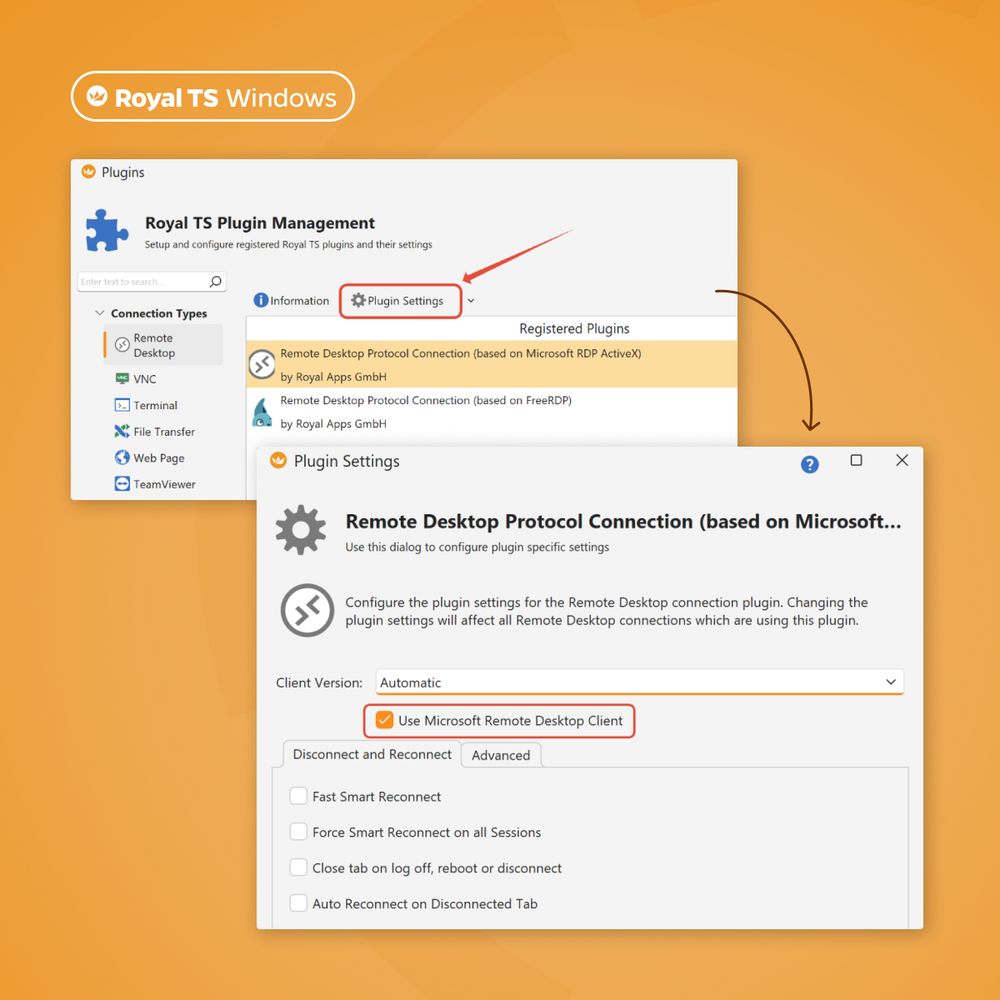
Notice of Deprecation: Microsoft Remote Desktop Client (RDC) 💡 Microsoft will end support for the Remote Desktop Client (MSRDC) on March 27, 2026. Recent updates have already impacted its integration with Royal TS — but there’s a manual workaround ➡️
www.royalapps.com/go/kb-ts-win...
www.royalapps.com/go/kb-ts-win...
December 9, 2025 at 2:53 PM
Notice of Deprecation: Microsoft Remote Desktop Client (RDC) 💡 Microsoft will end support for the Remote Desktop Client (MSRDC) on March 27, 2026. Recent updates have already impacted its integration with Royal TS — but there’s a manual workaround ➡️
www.royalapps.com/go/kb-ts-win...
www.royalapps.com/go/kb-ts-win...
Reposted by Stefan Koell
Looking to work with the Royal TS PowerShell Module? We’ve put together a short introduction to help you get started ⚙️ Full details can be found in the article ➡️
www.royalapps.com/go/kb-ts-win...
#RoyalTS #PowerShell #ITadmin #scripting
www.royalapps.com/go/kb-ts-win...
#RoyalTS #PowerShell #ITadmin #scripting


December 4, 2025 at 2:58 PM
Looking to work with the Royal TS PowerShell Module? We’ve put together a short introduction to help you get started ⚙️ Full details can be found in the article ➡️
www.royalapps.com/go/kb-ts-win...
#RoyalTS #PowerShell #ITadmin #scripting
www.royalapps.com/go/kb-ts-win...
#RoyalTS #PowerShell #ITadmin #scripting
Reposted by Stefan Koell
You like customizing the app as much as we do? Then check out these Royal TS/X Settings you might not know about! 💡
#itops #remotemanagement #software #productivity #rdp #workflow #app
#itops #remotemanagement #software #productivity #rdp #workflow #app


December 2, 2025 at 2:56 PM
You like customizing the app as much as we do? Then check out these Royal TS/X Settings you might not know about! 💡
#itops #remotemanagement #software #productivity #rdp #workflow #app
#itops #remotemanagement #software #productivity #rdp #workflow #app
Reposted by Stefan Koell
💥 Time for another epic deal!
Grab Royal TS (for Windows) and Royal TSX (for macOS) at an amazing price and save 50% with the code “CYBERMONDAY25” ➡️ royalapps.com/ts/win/buy
#CyberMonday #IT #discount
Grab Royal TS (for Windows) and Royal TSX (for macOS) at an amazing price and save 50% with the code “CYBERMONDAY25” ➡️ royalapps.com/ts/win/buy
#CyberMonday #IT #discount

December 1, 2025 at 7:08 AM
💥 Time for another epic deal!
Grab Royal TS (for Windows) and Royal TSX (for macOS) at an amazing price and save 50% with the code “CYBERMONDAY25” ➡️ royalapps.com/ts/win/buy
#CyberMonday #IT #discount
Grab Royal TS (for Windows) and Royal TSX (for macOS) at an amazing price and save 50% with the code “CYBERMONDAY25” ➡️ royalapps.com/ts/win/buy
#CyberMonday #IT #discount
Reposted by Stefan Koell
Prefer KiTTY or ExtraPuTTY instead of PuTTY? 👀 Here’s how to integrate it in your workflow!
Read the full post here ➡️ www.royalapps.com/blog/prefer-...
#royalts #remotemanagement #sysadmin #externalapplications #KiTTY #PuTTY #ExtraPuTTY #ITtools #productivitytips
Read the full post here ➡️ www.royalapps.com/blog/prefer-...
#royalts #remotemanagement #sysadmin #externalapplications #KiTTY #PuTTY #ExtraPuTTY #ITtools #productivitytips


November 27, 2025 at 4:25 PM
Prefer KiTTY or ExtraPuTTY instead of PuTTY? 👀 Here’s how to integrate it in your workflow!
Read the full post here ➡️ www.royalapps.com/blog/prefer-...
#royalts #remotemanagement #sysadmin #externalapplications #KiTTY #PuTTY #ExtraPuTTY #ITtools #productivitytips
Read the full post here ➡️ www.royalapps.com/blog/prefer-...
#royalts #remotemanagement #sysadmin #externalapplications #KiTTY #PuTTY #ExtraPuTTY #ITtools #productivitytips
Reposted by Stefan Koell
💥 Time for epic deals!
Grab Royal TS (for Windows) and Royal TSX (for macOS) at an amazing price and save 50% with the code “BLACKFRIDAY25” ➡️ royalapps.com/ts/win/buy
#BlackFriday #IT #discount
Grab Royal TS (for Windows) and Royal TSX (for macOS) at an amazing price and save 50% with the code “BLACKFRIDAY25” ➡️ royalapps.com/ts/win/buy
#BlackFriday #IT #discount

November 28, 2025 at 6:25 AM
💥 Time for epic deals!
Grab Royal TS (for Windows) and Royal TSX (for macOS) at an amazing price and save 50% with the code “BLACKFRIDAY25” ➡️ royalapps.com/ts/win/buy
#BlackFriday #IT #discount
Grab Royal TS (for Windows) and Royal TSX (for macOS) at an amazing price and save 50% with the code “BLACKFRIDAY25” ➡️ royalapps.com/ts/win/buy
#BlackFriday #IT #discount
Reposted by Stefan Koell
Did you know that you can integrate external applications (executables) into Royal TS? 💡 You can read more about it here ➡️ www.royalapps.com/go/help-ts-w...
#devops #itadmin #remotemanagement #RDP #msrdp #remotedesktop #Azure #bastion #SSH #VNC
#devops #itadmin #remotemanagement #RDP #msrdp #remotedesktop #Azure #bastion #SSH #VNC

November 24, 2025 at 2:53 PM
Did you know that you can integrate external applications (executables) into Royal TS? 💡 You can read more about it here ➡️ www.royalapps.com/go/help-ts-w...
#devops #itadmin #remotemanagement #RDP #msrdp #remotedesktop #Azure #bastion #SSH #VNC
#devops #itadmin #remotemanagement #RDP #msrdp #remotedesktop #Azure #bastion #SSH #VNC
Reposted by Stefan Koell
7 days to go 👀
#devops #itadmin #remotemanagement #RDP #msrdp #remotedesktop #Azure #bastion #SSH #VNC
#devops #itadmin #remotemanagement #RDP #msrdp #remotedesktop #Azure #bastion #SSH #VNC

November 21, 2025 at 6:08 AM
7 days to go 👀
#devops #itadmin #remotemanagement #RDP #msrdp #remotedesktop #Azure #bastion #SSH #VNC
#devops #itadmin #remotemanagement #RDP #msrdp #remotedesktop #Azure #bastion #SSH #VNC
Reposted by Stefan Koell
❗️ Important Security Advisory: We strongly recommend updating to the latest version of Royal Server immediately
🔒
➡️ You can read more about the vulnerability here: www.royalapps.com/blog/importa...
🔒
➡️ You can read more about the vulnerability here: www.royalapps.com/blog/importa...


November 13, 2025 at 9:28 AM
❗️ Important Security Advisory: We strongly recommend updating to the latest version of Royal Server immediately
🔒
➡️ You can read more about the vulnerability here: www.royalapps.com/blog/importa...
🔒
➡️ You can read more about the vulnerability here: www.royalapps.com/blog/importa...
Reposted by Stefan Koell
Did you know you can view your TOTP MFA Credentials with just one click? 👀
➡️ For Windows users, go to view → TOTP MFA Credentials
➡️ For macOS users, you can add it with view → Customize Toolbar…
#itops #remotemanagement #technology #software #productivity #rdp #quicktip #credentials
➡️ For Windows users, go to view → TOTP MFA Credentials
➡️ For macOS users, you can add it with view → Customize Toolbar…
#itops #remotemanagement #technology #software #productivity #rdp #quicktip #credentials


October 6, 2025 at 2:00 PM
Did you know you can view your TOTP MFA Credentials with just one click? 👀
➡️ For Windows users, go to view → TOTP MFA Credentials
➡️ For macOS users, you can add it with view → Customize Toolbar…
#itops #remotemanagement #technology #software #productivity #rdp #quicktip #credentials
➡️ For Windows users, go to view → TOTP MFA Credentials
➡️ For macOS users, you can add it with view → Customize Toolbar…
#itops #remotemanagement #technology #software #productivity #rdp #quicktip #credentials
Reposted by Stefan Koell
No more scattered info 💡 With our Notes tool, you can attach links, documentation, connection specific details and much more — making your workflow organized and transparent.
#itops #remotemanagement #technology #software #productivity #rdp
#itops #remotemanagement #technology #software #productivity #rdp


September 25, 2025 at 2:04 PM
No more scattered info 💡 With our Notes tool, you can attach links, documentation, connection specific details and much more — making your workflow organized and transparent.
#itops #remotemanagement #technology #software #productivity #rdp
#itops #remotemanagement #technology #software #productivity #rdp
Why, @Apple?! Needed a new keyboard. Look what they did. They crammed the fn key next to the control key. I f*cking hate @Apple for this. Impossible to work with that - especially if my MacBook keyboard (and all the other keyboards I have) use a different layout. WTF?! Why?!

September 24, 2025 at 12:26 PM
Why, @Apple?! Needed a new keyboard. Look what they did. They crammed the fn key next to the control key. I f*cking hate @Apple for this. Impossible to work with that - especially if my MacBook keyboard (and all the other keyboards I have) use a different layout. WTF?! Why?!
Reposted by Stefan Koell
Tired of repeating the same task again and again? ⏳ With “Broadcast Input to All Terminal Sessions” for Royal TSX, you can enter your data once and apply it to multiple Terminal Sessions instantly. That means less manual work, more time saved, and a smoother workflow! 💡

September 22, 2025 at 1:59 PM
Tired of repeating the same task again and again? ⏳ With “Broadcast Input to All Terminal Sessions” for Royal TSX, you can enter your data once and apply it to multiple Terminal Sessions instantly. That means less manual work, more time saved, and a smoother workflow! 💡
Reposted by Stefan Koell
Increase the flexibility of your workflow with Overrides 🚀 From the personalization of Connection properties, working with two different sets of credentials to applying secure gateway or proxy configuration — everything without actually modifying the Connection in a document 💡


September 18, 2025 at 1:53 PM
Increase the flexibility of your workflow with Overrides 🚀 From the personalization of Connection properties, working with two different sets of credentials to applying secure gateway or proxy configuration — everything without actually modifying the Connection in a document 💡
Reposted by Stefan Koell
💡 Did you know that you can copy your connection’s configuration to the Default Settings with just one click? 👀 With “Copy to Default Settings” you can easily overwrite your Default Settings of the corresponding Connection Type!
#itops #remotemanagement #technology #software #productivity #rdp
#itops #remotemanagement #technology #software #productivity #rdp

September 15, 2025 at 7:00 AM
💡 Did you know that you can copy your connection’s configuration to the Default Settings with just one click? 👀 With “Copy to Default Settings” you can easily overwrite your Default Settings of the corresponding Connection Type!
#itops #remotemanagement #technology #software #productivity #rdp
#itops #remotemanagement #technology #software #productivity #rdp
Reposted by Stefan Koell
Need some more screen real estate? 👀 Optimize your workspace with the Compact User Interface Mode in Royal TS V7 💡
#itops #remotemanagement #technology #software #productivity #rdp #ssh
#itops #remotemanagement #technology #software #productivity #rdp #ssh

September 8, 2025 at 11:45 AM
Need some more screen real estate? 👀 Optimize your workspace with the Compact User Interface Mode in Royal TS V7 💡
#itops #remotemanagement #technology #software #productivity #rdp #ssh
#itops #remotemanagement #technology #software #productivity #rdp #ssh
Reposted by Stefan Koell
🔎 No matching host key type found? Don’t worry! Here’s how to adjust your SSH configuration in Royal TSX!
#itops #remotemanagement #technology #software #productivity #rdp #ssh #sshconfig #config
#itops #remotemanagement #technology #software #productivity #rdp #ssh #sshconfig #config


September 4, 2025 at 11:45 AM
🔎 No matching host key type found? Don’t worry! Here’s how to adjust your SSH configuration in Royal TSX!
#itops #remotemanagement #technology #software #productivity #rdp #ssh #sshconfig #config
#itops #remotemanagement #technology #software #productivity #rdp #ssh #sshconfig #config
Reposted by Stefan Koell
It’s #QuickTipMonday 💡 Did you know that we've implemented a button that allows you to apply inheritance for Credentials, Tasks and Gateways on folder objects? Simply click on “Apply Inheritance”!
#rdp #ssh #security #remotemanagement #technology
#rdp #ssh #security #remotemanagement #technology

August 25, 2025 at 11:56 AM
It’s #QuickTipMonday 💡 Did you know that we've implemented a button that allows you to apply inheritance for Credentials, Tasks and Gateways on folder objects? Simply click on “Apply Inheritance”!
#rdp #ssh #security #remotemanagement #technology
#rdp #ssh #security #remotemanagement #technology
Reposted by Stefan Koell
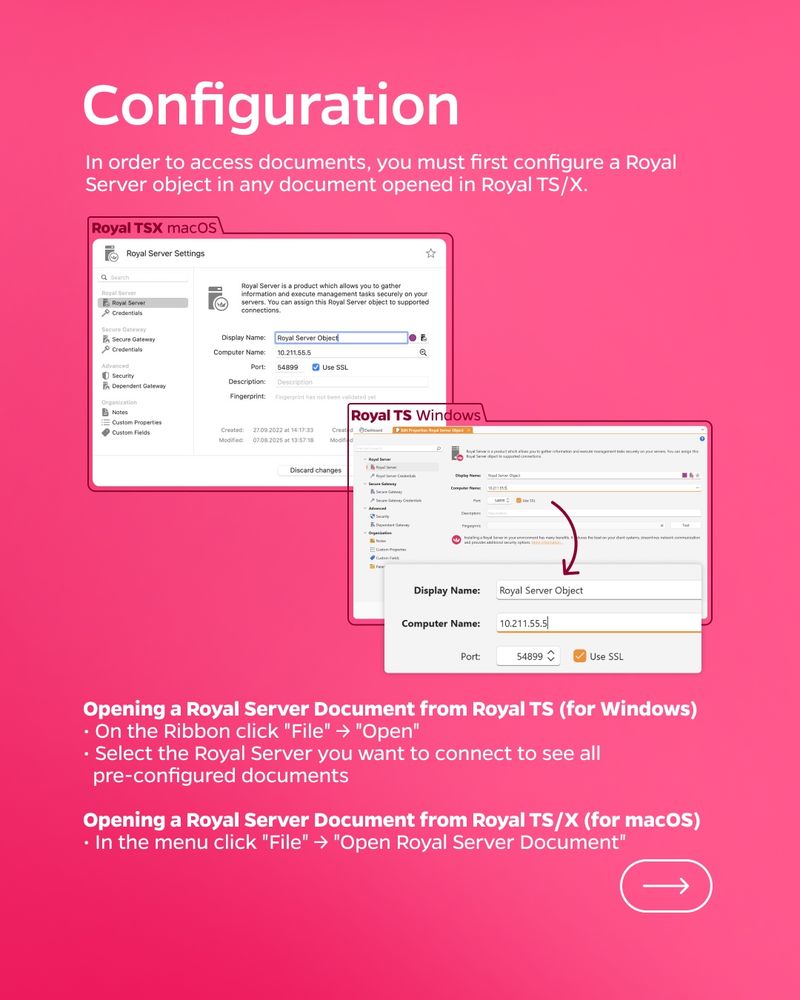
🗂️ The Document Store in Royal Server provides one secure, encrypted hub for all your Royal TS/X documents — with backups and access control built in 🔒
Read more here: docs.royalapps.com/r2023/royals...
#rdp #ssh #security #remotemanagement #technology
Read more here: docs.royalapps.com/r2023/royals...
#rdp #ssh #security #remotemanagement #technology



August 22, 2025 at 6:55 AM
🗂️ The Document Store in Royal Server provides one secure, encrypted hub for all your Royal TS/X documents — with backups and access control built in 🔒
Read more here: docs.royalapps.com/r2023/royals...
#rdp #ssh #security #remotemanagement #technology
Read more here: docs.royalapps.com/r2023/royals...
#rdp #ssh #security #remotemanagement #technology