




Kya
@kyamae.bsky.social
In no particular order: Nerd, geek, trans woman, TTRPGs, video games, language/linguistics/etymology, post-Mormon, autistic, love to learn new things | she/her
The #1 movie from when you were 10 years old is how your 2026 will go.
Idk who the king in question would be irl but considering the return of the king here is an unambiguously good thing and ushers in an era of peace and prosperity, I’ll take it.
Idk who the king in question would be irl but considering the return of the king here is an unambiguously good thing and ushers in an era of peace and prosperity, I’ll take it.

December 21, 2025 at 7:25 AM
The #1 movie from when you were 10 years old is how your 2026 will go.
Idk who the king in question would be irl but considering the return of the king here is an unambiguously good thing and ushers in an era of peace and prosperity, I’ll take it.
Idk who the king in question would be irl but considering the return of the king here is an unambiguously good thing and ushers in an era of peace and prosperity, I’ll take it.


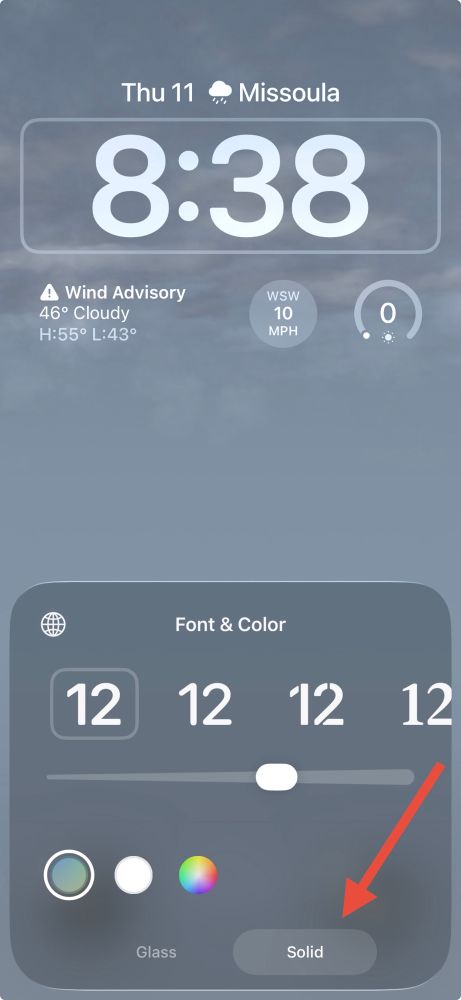
Tip 3:
Go to Settings App -> Wallpaper
Select the lock screen under “Current”, then tap on the clock at the top, and at the bottom under the font options, select the “Solid” option.
This will make it so you can actually read the clock on your lock screen instead of it being transparent.
Go to Settings App -> Wallpaper
Select the lock screen under “Current”, then tap on the clock at the top, and at the bottom under the font options, select the “Solid” option.
This will make it so you can actually read the clock on your lock screen instead of it being transparent.


December 11, 2025 at 3:53 PM
Tip 3:
Go to Settings App -> Wallpaper
Select the lock screen under “Current”, then tap on the clock at the top, and at the bottom under the font options, select the “Solid” option.
This will make it so you can actually read the clock on your lock screen instead of it being transparent.
Go to Settings App -> Wallpaper
Select the lock screen under “Current”, then tap on the clock at the top, and at the bottom under the font options, select the “Solid” option.
This will make it so you can actually read the clock on your lock screen instead of it being transparent.
Tip 2:
Go to Settings App -> Accessibility -> Display & Text Size
And turn on “Reduce Transparency”
This will make your app folders on your Home Screen look like they used to with the semi-opaque background.
Go to Settings App -> Accessibility -> Display & Text Size
And turn on “Reduce Transparency”
This will make your app folders on your Home Screen look like they used to with the semi-opaque background.


December 11, 2025 at 3:53 PM
Tip 2:
Go to Settings App -> Accessibility -> Display & Text Size
And turn on “Reduce Transparency”
This will make your app folders on your Home Screen look like they used to with the semi-opaque background.
Go to Settings App -> Accessibility -> Display & Text Size
And turn on “Reduce Transparency”
This will make your app folders on your Home Screen look like they used to with the semi-opaque background.
Tip 1:
Go to Settings App -> Display & Brightness -> Liquid Glass
And select the “Tinted” Option
This will remove some of the weird see-through-ness imposed by the update.
Go to Settings App -> Display & Brightness -> Liquid Glass
And select the “Tinted” Option
This will remove some of the weird see-through-ness imposed by the update.


December 11, 2025 at 3:53 PM
Tip 1:
Go to Settings App -> Display & Brightness -> Liquid Glass
And select the “Tinted” Option
This will remove some of the weird see-through-ness imposed by the update.
Go to Settings App -> Display & Brightness -> Liquid Glass
And select the “Tinted” Option
This will remove some of the weird see-through-ness imposed by the update.

And just as with carcinization and arborization, we now see that the video game console has independently evolved back into a more perfected form, the GameCube.

November 12, 2025 at 6:23 PM
And just as with carcinization and arborization, we now see that the video game console has independently evolved back into a more perfected form, the GameCube.
Here’s hot take for you all:

October 25, 2025 at 9:42 PM
Here’s hot take for you all:
I need you all to know that this picture of Peanut the Mastiff has immediately shot up in my all time animal photo rankings to sit right up top with The Frog™, which followers from the old hellsite will recognize as EXTREMELY IMPORTANT to me.

October 2, 2025 at 4:55 AM
I need you all to know that this picture of Peanut the Mastiff has immediately shot up in my all time animal photo rankings to sit right up top with The Frog™, which followers from the old hellsite will recognize as EXTREMELY IMPORTANT to me.
No feeling quite like that of playing a rogue, getting a crit, and rolling almost max damage on your sneak attack. Truly exquisite.

August 31, 2025 at 10:49 PM
No feeling quite like that of playing a rogue, getting a crit, and rolling almost max damage on your sneak attack. Truly exquisite.

Environmental storytelling at its finest.

June 29, 2025 at 9:39 PM
Environmental storytelling at its finest.


When you as your DnD character make a call in in a dragon fight thinking it will be advantageous and it turns out to be very much the opposite:

May 18, 2025 at 4:49 AM
When you as your DnD character make a call in in a dragon fight thinking it will be advantageous and it turns out to be very much the opposite:
This is what marriage is like, in case anyone was wondering.

May 15, 2025 at 12:46 AM
This is what marriage is like, in case anyone was wondering.
Wait wait wait! I thought of a better one!

May 10, 2025 at 6:24 AM
Wait wait wait! I thought of a better one!
This image forced itself into my my mind so now i must inflict it on all of you. I’m sorry

May 9, 2025 at 4:16 PM
This image forced itself into my my mind so now i must inflict it on all of you. I’m sorry
Niced myself up to get some immigration photos today, but you have to be all straight faced and boring for those, so here’s a couple selfies I took of me looking cute and happy afterwards. Couldn’t let this effort go unappreciated 😊


April 11, 2025 at 8:16 PM
Niced myself up to get some immigration photos today, but you have to be all straight faced and boring for those, so here’s a couple selfies I took of me looking cute and happy afterwards. Couldn’t let this effort go unappreciated 😊
Sometimes you’re just casually doing #DnD session prep at work and out of nowhere you get a 1/10,000 roll. (Yes I know that any unique roll on 2d100 is a 1/10,000 chance. Two 100s is still wild. Don’t “um actually” me about statistics.)

March 26, 2025 at 8:10 PM
Sometimes you’re just casually doing #DnD session prep at work and out of nowhere you get a 1/10,000 roll. (Yes I know that any unique roll on 2d100 is a 1/10,000 chance. Two 100s is still wild. Don’t “um actually” me about statistics.)
Made myself fancy grilled cheese for lunch with leftover pork shoulder and sour dough bread. It’s very tasty 😋

February 22, 2025 at 7:54 PM
Made myself fancy grilled cheese for lunch with leftover pork shoulder and sour dough bread. It’s very tasty 😋
Found this in my notes app and realized Twitter got to see it but BlueSky never did, so here you go butterfly people, please enjoy.

January 31, 2025 at 9:45 PM
Found this in my notes app and realized Twitter got to see it but BlueSky never did, so here you go butterfly people, please enjoy.
Overhearing this conversation from the office has me remembering one of the best memes I’ve ever made. Here you go BlueSky, enjoy!

January 16, 2025 at 4:37 AM
Overhearing this conversation from the office has me remembering one of the best memes I’ve ever made. Here you go BlueSky, enjoy!
Having some great fun this weekend in #Helldivers2 with @dndgeo.bsky.social, @mastraco.la, and some other friends. I was particularly proud of this close call I had tonight!
December 22, 2024 at 7:12 AM
Having some great fun this weekend in #Helldivers2 with @dndgeo.bsky.social, @mastraco.la, and some other friends. I was particularly proud of this close call I had tonight!