


Christian
@christianjames.bsky.social
Made a composite for today's project 365 entry. I haven’t played with composites much before but I think I like it over the monotone non-composite version.


January 10, 2025 at 1:22 PM
Made a composite for today's project 365 entry. I haven’t played with composites much before but I think I like it over the monotone non-composite version.
I really wish BlueSky would add an image carousel like on Threads. It’s such a nice feature. And also please increase the number of photos per post 🙏
January 7, 2025 at 9:59 PM
I really wish BlueSky would add an image carousel like on Threads. It’s such a nice feature. And also please increase the number of photos per post 🙏
First week of my Project 365. I’m really enjoying it so far.


January 7, 2025 at 9:55 PM
First week of my Project 365. I’m really enjoying it so far.
A small update to Fig is out on TestFlight.
You can now adjust the black point and white point of your Image Processes using the tone curve tool! (It also fixes a viewfinder bug on the iPhone SE)
You can now adjust the black point and white point of your Image Processes using the tone curve tool! (It also fixes a viewfinder bug on the iPhone SE)

November 24, 2024 at 11:33 AM
A small update to Fig is out on TestFlight.
You can now adjust the black point and white point of your Image Processes using the tone curve tool! (It also fixes a viewfinder bug on the iPhone SE)
You can now adjust the black point and white point of your Image Processes using the tone curve tool! (It also fixes a viewfinder bug on the iPhone SE)
Here's another example of the new image processing in my camera app Fig.
Compared to the standard iPhone process, it turns off the sharpening and tone mapping. It keeps the shadows dark and fixes the "crunchy" effect so common in iPhone pictures.
Compared to the standard iPhone process, it turns off the sharpening and tone mapping. It keeps the shadows dark and fixes the "crunchy" effect so common in iPhone pictures.

November 18, 2024 at 12:00 PM
Here's another example of the new image processing in my camera app Fig.
Compared to the standard iPhone process, it turns off the sharpening and tone mapping. It keeps the shadows dark and fixes the "crunchy" effect so common in iPhone pictures.
Compared to the standard iPhone process, it turns off the sharpening and tone mapping. It keeps the shadows dark and fixes the "crunchy" effect so common in iPhone pictures.
Are there any Mac apps for Bluesky yet?
November 18, 2024 at 5:01 AM
Are there any Mac apps for Bluesky yet?
Here's a comparison of my new image process vs the standard iPhone process.
The shadows on the day were really strong, but the standard iPhone process loses them completely as it always tries to keep everything visible and bright.
The shadows on the day were really strong, but the standard iPhone process loses them completely as it always tries to keep everything visible and bright.

November 18, 2024 at 1:21 AM
Here's a comparison of my new image process vs the standard iPhone process.
The shadows on the day were really strong, but the standard iPhone process loses them completely as it always tries to keep everything visible and bright.
The shadows on the day were really strong, but the standard iPhone process loses them completely as it always tries to keep everything visible and bright.
If Apple does make a tv, I really hope they give it the nano-texture finish
November 17, 2024 at 11:49 PM
If Apple does make a tv, I really hope they give it the nano-texture finish
I just released a new update to my camera app Fig!
There’s now a custom curves tool, so you can apply your own tone curve to your images! And for users with Pro iPhones, there’s a new prototype process to try out!
Join the TestFlight here: testflight.apple.com/join/4GkKEDhd
There’s now a custom curves tool, so you can apply your own tone curve to your images! And for users with Pro iPhones, there’s a new prototype process to try out!
Join the TestFlight here: testflight.apple.com/join/4GkKEDhd

Join the Fig Camera beta
Available on iOS
testflight.apple.com
November 17, 2024 at 11:44 AM
I just released a new update to my camera app Fig!
There’s now a custom curves tool, so you can apply your own tone curve to your images! And for users with Pro iPhones, there’s a new prototype process to try out!
Join the TestFlight here: testflight.apple.com/join/4GkKEDhd
There’s now a custom curves tool, so you can apply your own tone curve to your images! And for users with Pro iPhones, there’s a new prototype process to try out!
Join the TestFlight here: testflight.apple.com/join/4GkKEDhd
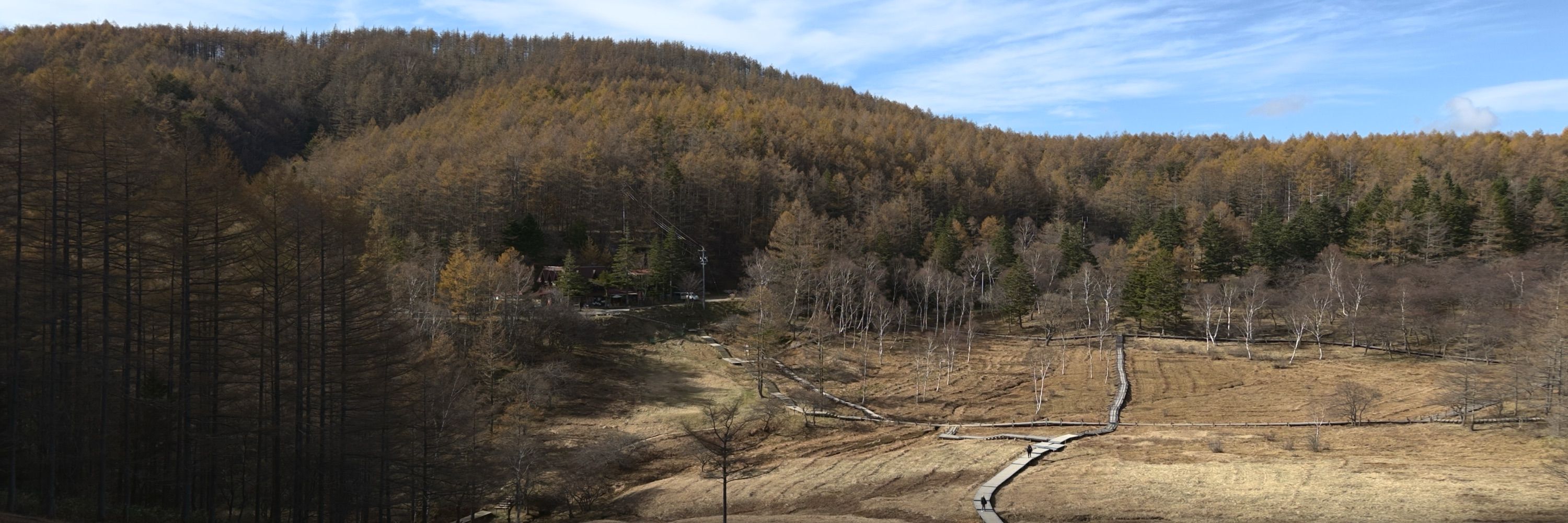
Recently I’ve been working on a new image process for my iPhone camera app Fig. It uses ProRAW but disables all the tone mapping and sharpening, and instead uses some simple tone curves to give a natural looking image. Here are some shots I took over the weekend in Nagano.


November 14, 2024 at 6:41 AM
Recently I’ve been working on a new image process for my iPhone camera app Fig. It uses ProRAW but disables all the tone mapping and sharpening, and instead uses some simple tone curves to give a natural looking image. Here are some shots I took over the weekend in Nagano.